
Student Hours
K-5th Grade Student hours: 8:00 a.m. to 3:00 p.m.
6th-8th Grade Student hours: 8:15 a.m. to 3:15 p.m.
*Important: C2E does NOT follow DCSDs late start Friday schedule
Morning Drop-off and Afternoon Pick-up
- Elementary (K–5): 8:00 a.m. – 3:00 p.m. (C2E does NOT follow DCSDs late start Friday schedule)
- Drop-Off Window: 7:40 – 7:55 a.m.
- Pick-Up Window: 3:00 – 3:15 p.m.
- Drop-Off Window: 7:40 – 7:55 a.m.
- Middle School (6–8): 8:15 a.m. – 3:15 p.m. (C2E does NOT follow DCSDs late start Friday schedule)
- Drop-Off Window: 7:55 – 8:10 a.m.
- Pick-Up Window: 3:15 – 3:30 p.m.
If you are running late, and cannot pickup your student by 3:30 PM, please contact the main office by telephone at 303-841-9816.
Fees will be assessed for students picked up after 3:30 PM.
Sibling Care
To support families with students in both elementary and middle school, we will be offering a Sibling Care window to streamline your experience.
For families with both ES and MS students:
- Drop-Off: 7:40 – 7:55 a.m.
- Pick-Up: 3:15 – 3:30 p.m.
Driveline
IMPORTANT: New Driveline App Required for Pickup
Beginning the 26-27 school year, parents will use the Driveline Family app’s “I have arrived” button in the Driveline Family app instead of displaying placards. All parents must download and log in to the app before the first day of school:
Please update your student’s Driveline app by 2:45 p.m. each school day. The app must accurately show:
- Where your student will go after school (Driveline, walker, sports, or club)
- Who is authorized to pick up your student, if applicable
Important: Walkers must be assigned as walkers in the app.
Announcing Your Arrival
- Driveline: Press and hold “I have arrived” while in your car as you approach the turn by the daycare.
- Walk-up pickup: Press and hold “I have arrived” once you are in the designated walk-up area.
- Continue holding the button until the app confirms that your arrival was submitted successfully. If there is an error, locate a staff member for assistance.
Tip: Use the weekly schedule to set your regular pickup plan. Then, you’ll only need to make updates when the plan changes.
Carpools and Other Approved Individuals
Parents may select other individuals whose names and contact information are already in the system, such as another C2E family.
If you need to add someone who is not currently in the system—such as a grandparent or neighbor—please email their name and cell phone number to office@c2e.org. Once that person has been added and approved by the school, they can be assigned a guest number for pickup.
App Setup and Login
Using the Driveline App
- Use the app to announce, “I have arrived.” Driveline placards are no longer needed and may be discarded.
- Pickup plans, locations, and authorized pickup persons must be updated in the app by 2:45 p.m. each school day.
- The “I have arrived” button will turn green at 2:45 p.m. Press and hold the button until the app confirms that your arrival was successfully submitted.
- Independent walkers are dismissed daily at 3:15 p.m.
- Enter the driveline from Carlson Drive. The traffic pattern is right turn in, right turn out only. Please review the traffic flow map in the Driveline Parent Handbook.
- Do not park or unload on Carlson Drive.
- Late pickups are subject to a fee of $1 per minute.
- For help with the app, email office@c2e.org.
App Setup and Login
Please follow the Driveline Family app instructions and watch this informational video to learn how to:
- Set up your account
- Add approved individuals for carpools
- Change your student’s pickup schedule
- Use other important app features
Once you have downloaded the app, log in using the same cell phone number you provided to the school. Confirm that all of your students appear in your account. If you cannot locate your student(s), please email office@c2e.org for assistance.
Driveline Transportation Management Plan
For more information regarding the Driveline Transportation Management Plan, please click here: C2E TMP.
C2E Walk Up/Off Routes
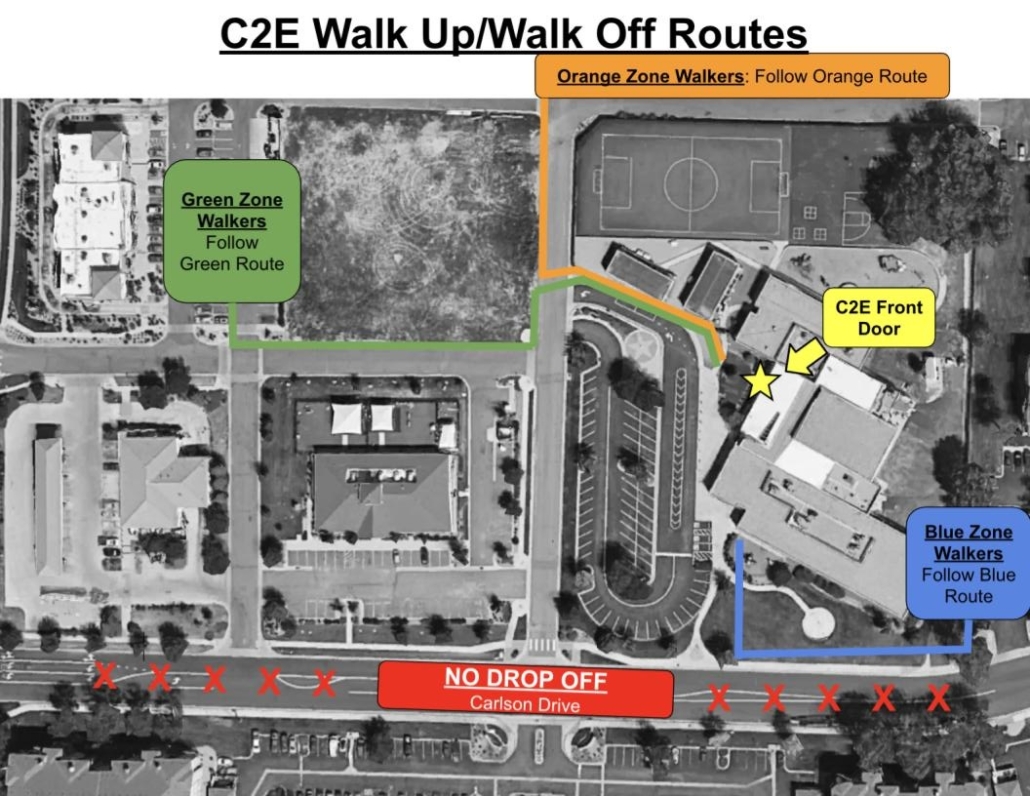
- Families walking from the vacant lot or hotel lot may now use the sidewalk directly south of the new building to reach the front door.
- All pedestrians must use designated sidewalks and crosswalks.
- Do not walk through the parking lot or driveline.
- Do not park or drop off on Carlson.
- Do not park at the nearby apartment complexes or daycare center.
Violations and Fines
Failure to follow these requirements may result in a warning or fine in accordance with the following schedule:
- First offense: Written warning (no fine)
- Second offense: $25.00
- Third offense: $50.00
- Fourth offense and subsequent violations: $100.00
C2E Driveline Routes
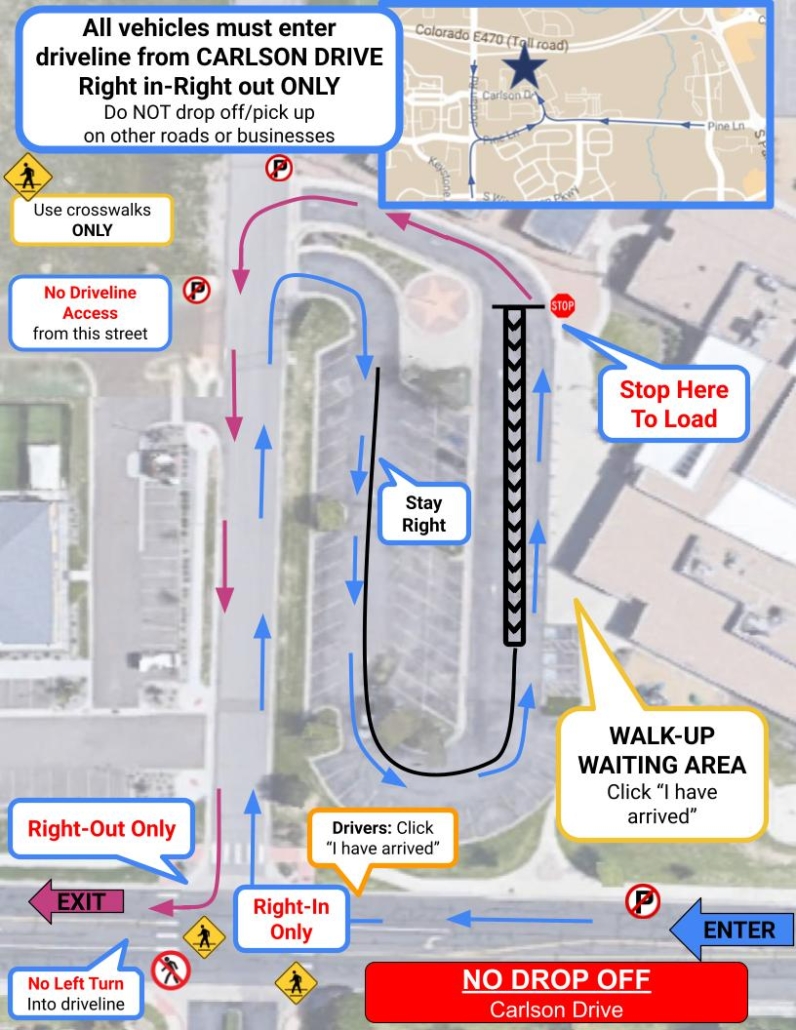
- Do not drop off students or park on Carlson between the school and the apartments.
- Do not turn left into the school driveway from Carlson. All vehicles must follow the blue arrows shown on the map.
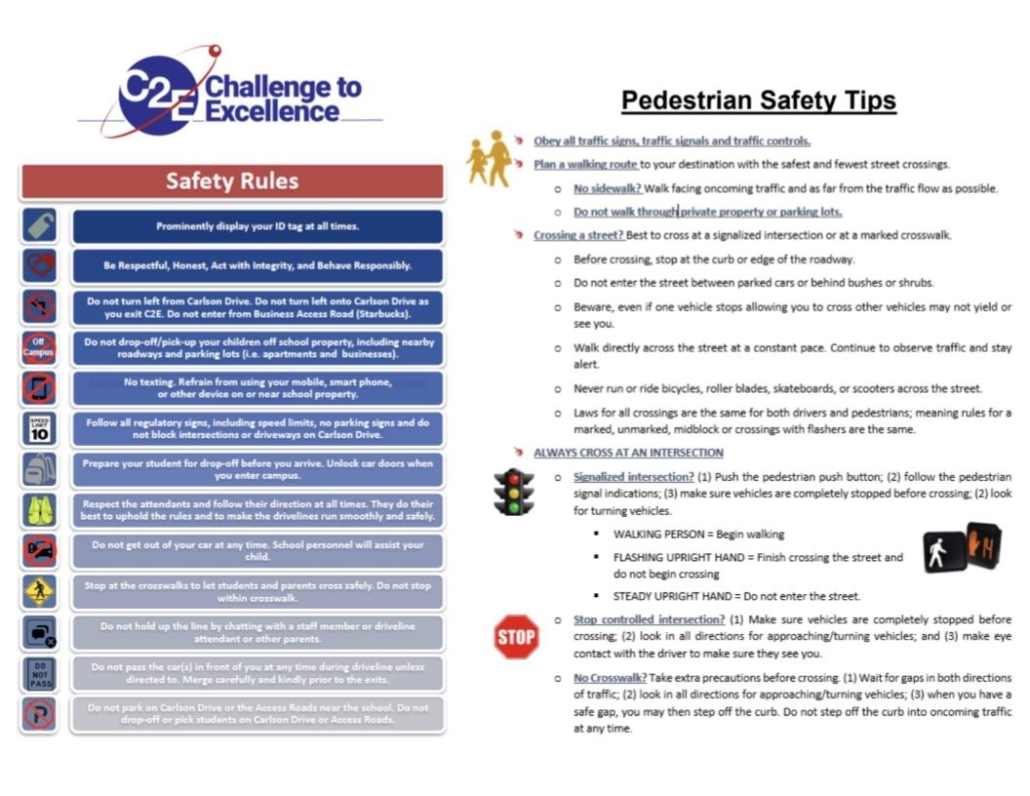
C2E Pedestrian Safety
Student Fees
Frequently Asked Questions Regarding Student Fees
What are student fees used for?
Student fees are used for classroom supplies, instructional materials, student programs/activities, and more.
Are there additional fees for middle school elective classes?
Not anymore! The new fee schedule covers the elective fees that used to be paid for separately.
What is not included in this fee?
Optional activities, such as field trips and after school clubs/sports are not included in the mandatory annual fee.
My student receives Free or Reduced Lunch; how does this affect the fee schedule?
C2E waives fees for students who receive Free or Reduced Lunch through DCSD. Families simply need to provide a copy of their Free/Reduced Lunch approval letter that was given to them by DCSD Nutrition Services to have the fees waived.
I paid my fees and then transferred schools; can I get a refund?
If a student transfers before August 31st, the total fee is refunded. Refunds are not provided after August.
Are there payment plans available?
Yes; families who need payment plan options may reach out to office personnel for assistance.
Mandatory Student Fees
Mandatory Annual Fee Schedule: Grades K-8
Paid before first day of school $200
Paid after first day of school $225
C2E uses MySchoolBucks to bill for all school fees, field trips, and sports costs. For more information about MySchoolBucks please click HERE.
Parent Student Handbook
The parent student handbook describes the contract between the school and students and parents. Rules and regulations, processes, dress code, etc. are all spelled out in the Parent Student Handbook. Click on the following to view or download the Parent Student Handbook.